1. Overview: Why Build Custom Workouts?
While ZoneTrainer comes with calibrated aerobic progression programs, real-world endurance running demands complete flexibility: pacing a 10 km race with a disciplined negative split, planning a progressive Sunday long run, or capping your heart rate on hilly terrain to avoid cardiac drift.
The Custom Workout Builder allows you to structure any session with precision, combining time, distance, heart rate ceilings, and zones into an automated, eyes-free audio coaching experience.
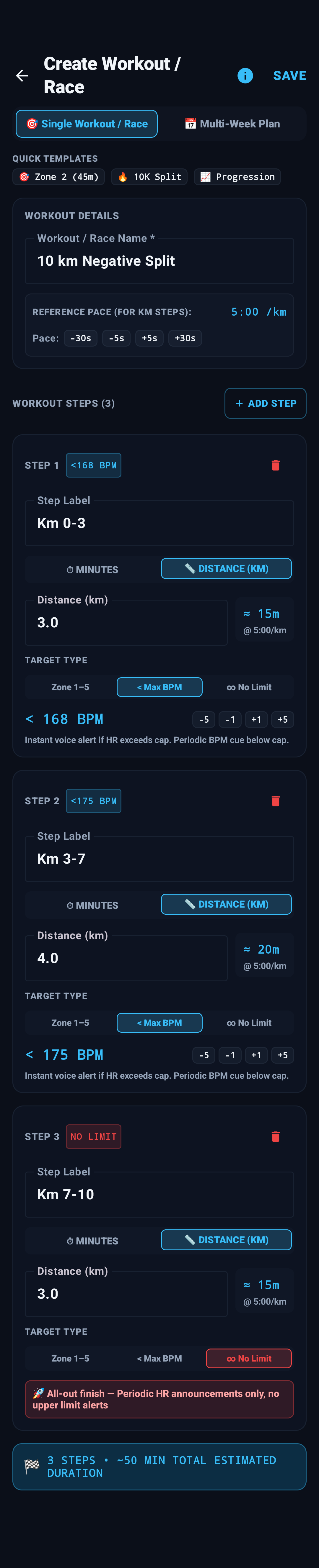
Complete workout creation interface with the 10K Negative Split strategy loaded.
2. The 2 Modes: Single Workout vs Multi-Week Plan
At the very top of the creation screen, a toggle lets you pick between two distinct architectures:
Best for: Today's training run, a weekend long run, or an upcoming race strategy.
- Custom multi-step sequencing (add as many steps as you want).
- Mix distance (KM) and duration (Minutes).
- Instant start: Saving immediately activates this workout as your current running session.
Best for: Multi-week macrocycles (1 to 26 weeks) with scheduled workouts across weeks.
- Select overall difficulty (Beginner, Intermediate, Advanced).
- Assign each workout to a target week number.
- Auto-generates Warm-up (Z1) → Main Work (Target Zone) → Cool-down (Z1).
3. Quick Templates: Zone 2, 10K Split & Progression
In Single Workout mode, the top template bar offers three 1-tap endurance blueprints:
Sets a clean, steady 45-minute Zone 2 cruise without warm-up or cool-down interruptions. Perfect for daily aerobic base runs.
Gold-standard negative split race pacing: controlled start (< 168 BPM) → sustained threshold (< 175 BPM) → all-out finish (No Limit).
Gradual 40-minute ladder: 15 min Zone 2 → 15 min Zone 3 Tempo → 10 min Zone 4 Threshold finish.
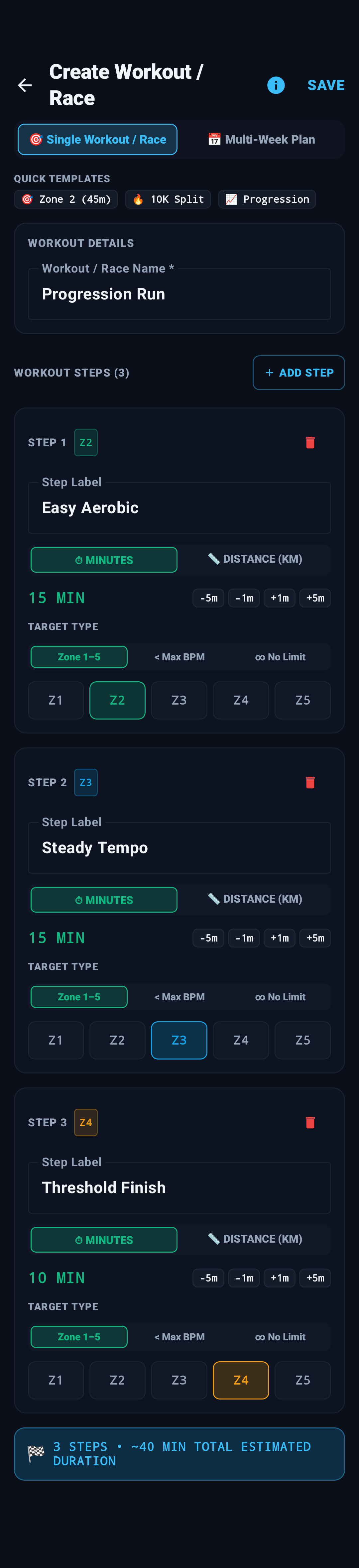
Progression Run Template (Z2 → Z3 → Z4)
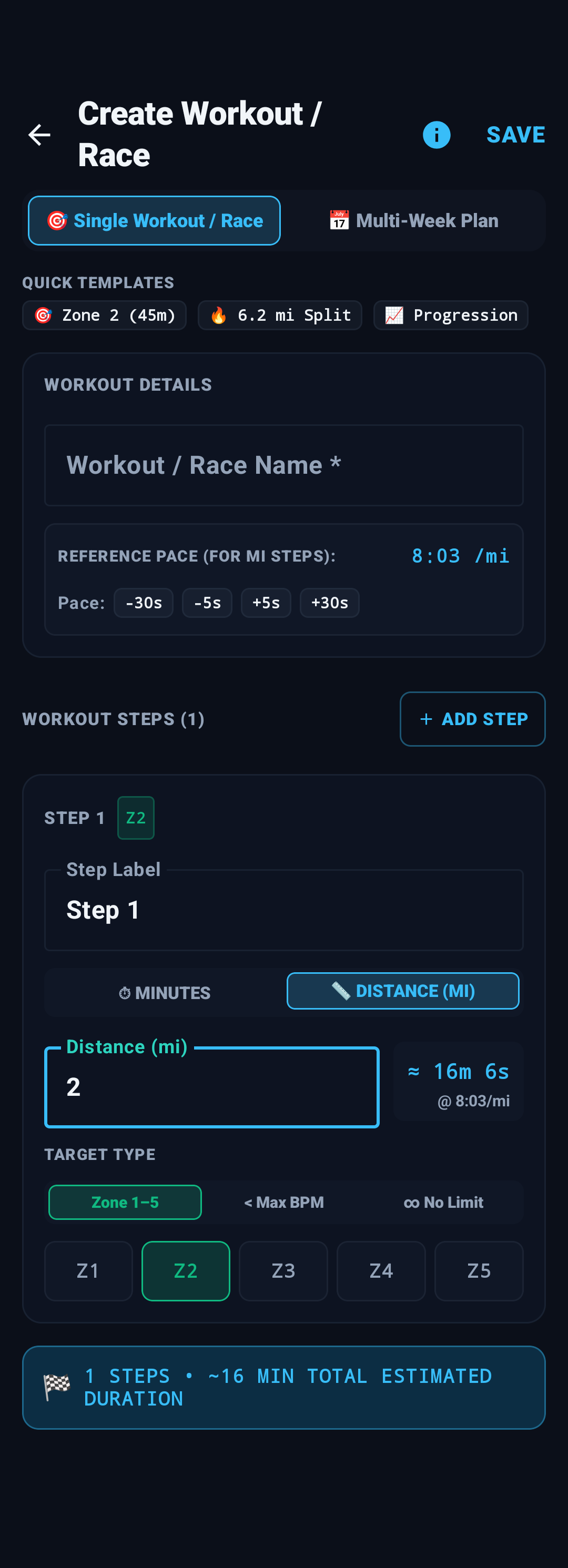
Miles (Imperial) Mode with 6.2 mi Split
4. Reference Pace & Unit Adaptation (KM & Miles)
Whenever any step in your workout uses Distance instead of fixed minutes, the Reference Pace card appears automatically below the workout name.
8:03 /mi in Imperial)
Unit Setting: ZoneTrainer inherits your preferred distance unit from Settings → Display → Distance & Pace Unit (or from the post-session recap sheet). When configured, all step distances (e.g. 3.0 km or 2.0 mi) and reference paces adapt seamlessly, while the -30s / -5s / +5s / +30s chips let you fine-tune your target pace.
5. Anatomy of a Step: Every Control Explained
Each step card in the workout builder provides granular control over pacing, duration, and physiological targets:
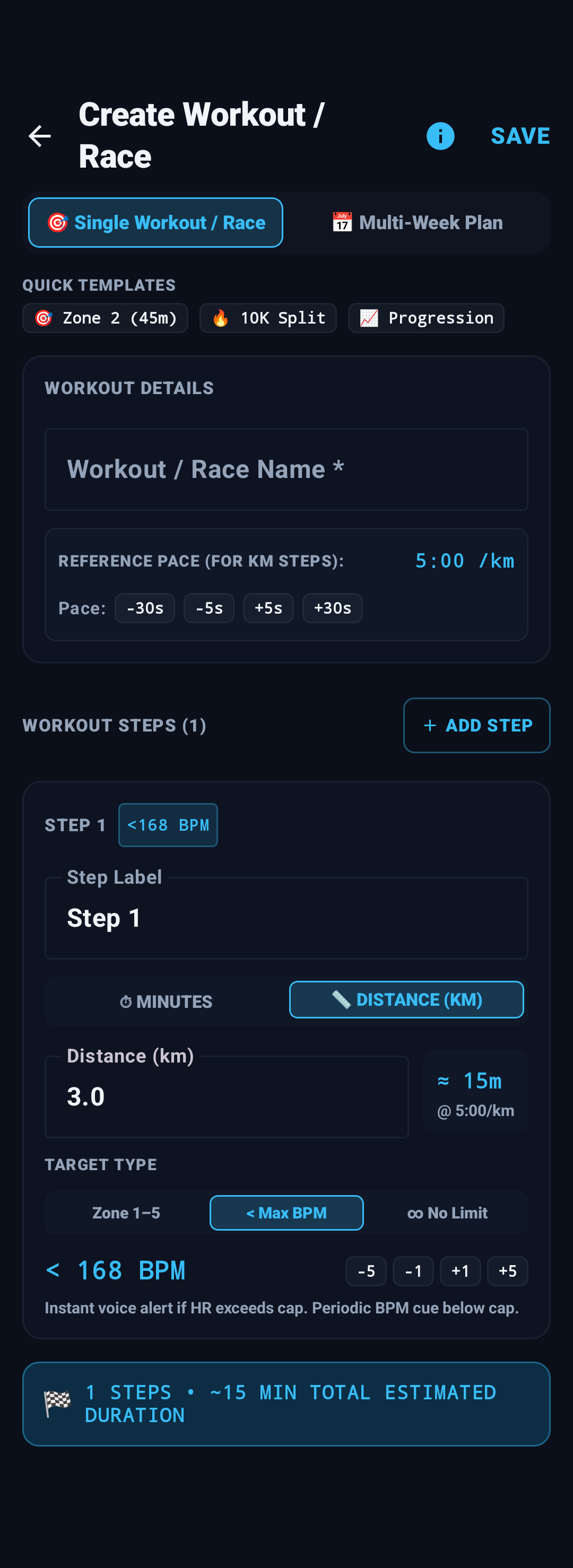
Distance (KM) + < Max BPM Ceiling
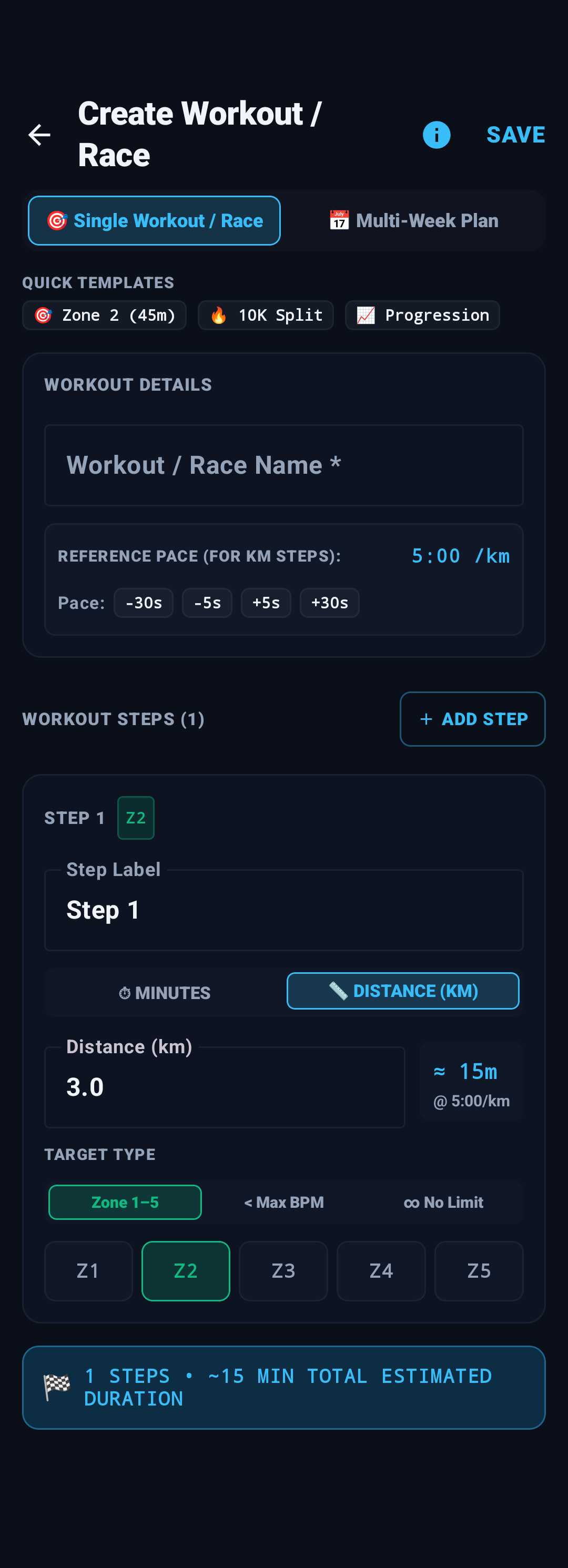
Distance (KM) + Strict Zone 2 Corridor
1. Step Label
A short name for the step (e.g. Warm-up, Km 0-3, Cruising Tempo, Final Kick). This label appears on your live workout HUD and lock-screen notification.
2. Duration Mode: Minutes vs Distance (KM)
- ⏱ MINUTES: Sets a fixed time block. Use the -5m, -1m, +1m, +5m buttons to adjust duration quickly between 1 and 180 minutes.
- 📏 DISTANCE (KM): Type any decimal distance (e.g.
3.0,4.2,10.0). The app instantly calculates the expected duration based on your Reference Pace.
3. Step Management Actions
- + ADD STEP: Appends a new step to your workout.
- Red Trash Can Icon: Removes the step (disabled when only one step remains).
- Summary Ribbon: Located at the bottom of the steps list, shows the total step count and total estimated duration in minutes (e.g. 🏁 3 STEPS • ~50 MIN TOTAL ESTIMATED DURATION).
6. Target Types: Max BPM, Zones 1–5 & No Limit
This is the core intelligence of ZoneTrainer's audio engine. Each step can be assigned one of three physiological target modes:
| Target Type | Visual Badge | How Audio Alerts Behave | Ideal Use Case |
|---|---|---|---|
| < Max BPM | < 168 BPM | Instant alert the exact second HR exceeds your cap (e.g. "Heart rate too high 170"). Below cap: quiet periodic BPM announcements. | Race start control, avoiding early fatigue, recovery runs on hilly courses. |
| Zone 1–5 | Z2 (Aerobic) | Dual-boundary coaching: alerts you if you drift above the zone OR drop below it, confirming return to the target zone. | Base aerobic building (Z2), tempo blocks (Z3), threshold intervals (Z4). |
| ∞ No Limit | NO LIMIT | Zero upper-limit alarms. Keeps regular BPM announcements active so you know where you stand, but never interrupts your stride. | Final 2 km of a race, finishing sprint, VO2max all-out intervals. |
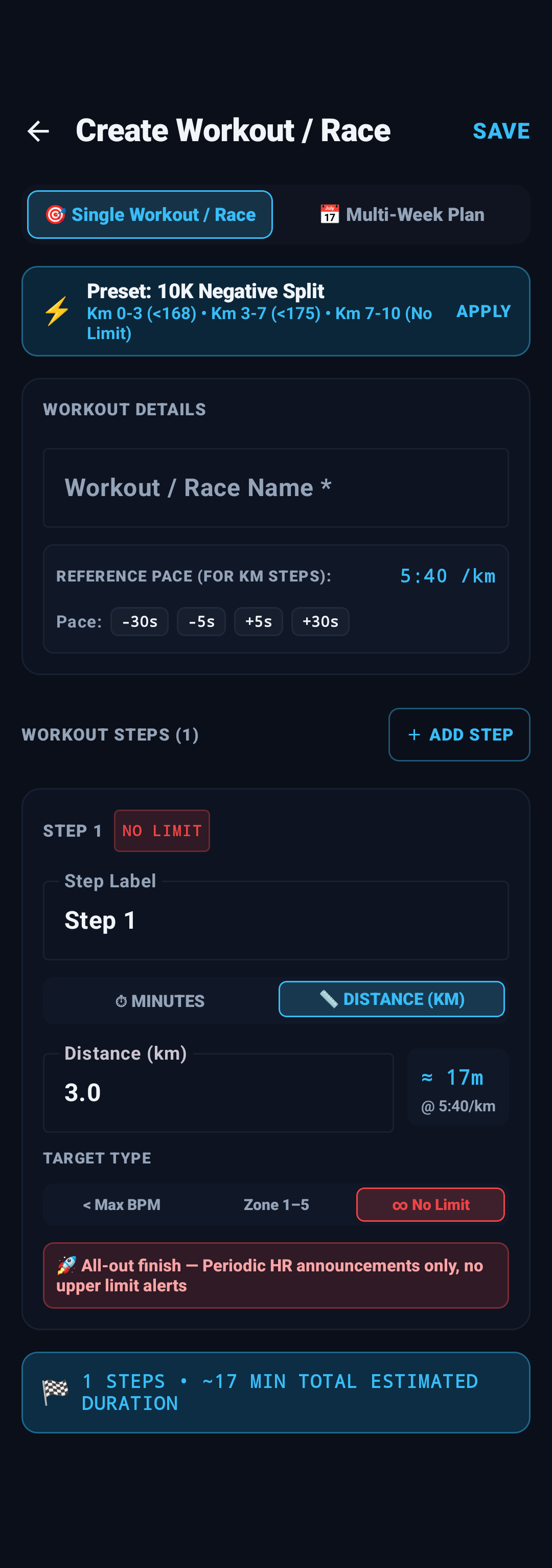
∞ No Limit for all-out race finishes
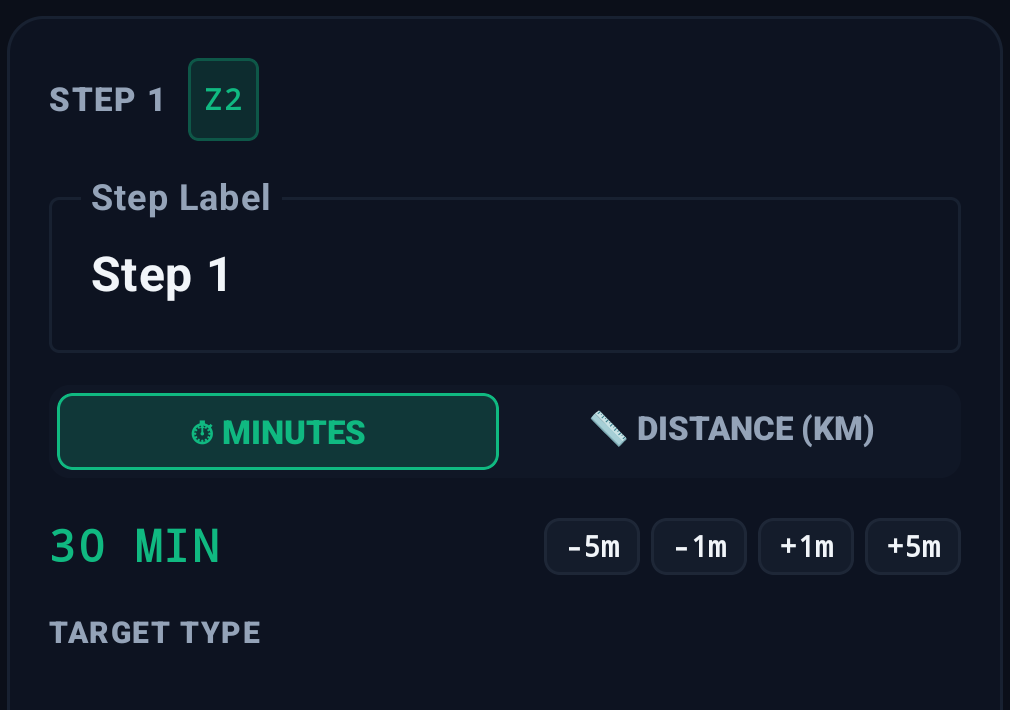
Minutes duration mode with quick -5m / +5m chips
7. Building Multi-Week Periodized Plans
Switching to 📅 Multi-Week Plan allows coaches and runners to structure full training progressions:
- Plan Details: Enter the program name, optional description, and select the difficulty (Beginner, Intermediate, or Advanced).
- Plan Duration Slider: Drag the slider from 1 to 26 weeks to define the length of your training block.
- Scheduled Workouts: Tap + ADD WORKOUT to schedule sessions into specific weeks (e.g. Workout 1 in Week 1, Workout 2 in Week 2).
- Automated 3-Stage Structure: For every workout created in this mode, ZoneTrainer automatically balances intervals:
- Warm-up: Zone 1 (up to 5 min or 25% of total time).
- Work: Target Zone (Z1 to Z5) for the main training block.
- Cool-down: Zone 1 recovery.
8. During the Run: Lock-Screen & Voice Cues
Once you tap SAVE, your custom session is ready to run immediately. Here is what happens out on the road:
🎧 Eyes-Free Audio Coaching
Your music ducks smoothly. ZoneTrainer announces your current step, your heart rate, and any threshold crossings without you ever looking at your phone.
📲 Lock-Screen "Next Step" Button
Running a distance step and passed the km marker early? A convenient Next Step action button right on your Android lock screen and persistent notification lets you advance manually with a single tap.
9. Frequently Asked Questions
Can I run distance (KM) steps without GPS?
Yes! ZoneTrainer uses your Reference Pace to convert distance steps into duration timelines. Even on a treadmill or in a GPS-denied tunnel, your audio cues and transitions continue accurately based on your target pace.
How do I delete or edit a custom program?
In the Programs screen, your custom creations display a distinct CUSTOM or SINGLE WORKOUT badge. Tap the trash icon on the program card to delete it, or select it to view the step schedule.
Does the workout builder require an internet connection?
No. Like all ZoneTrainer features, the workout builder is 100% offline. All steps, intervals, and programs are saved locally to your device's private SQLite database.
Ready to Build Your Custom Workout?
Get instant voice alerts, BPM ceilings, and hands-free interval coaching on Android.
Download ZoneTrainer Free